

Roofing CRM Software Built by a Roofer
The best roofing CRM for a roofing company is the one your team can use to move a real job from its first inquiry through inspection, estimate, signed contract, production and payment. Roof Flow AI brings those steps into one roofing CRM, with shared customer records, free field crew seats and tools built around roofing work.
What a roofing CRM does
A roofing CRM is your company's shared record of customers, properties, conversations and jobs. Instead of keeping the homeowner's number in one spreadsheet, the inspection photos on a rep's phone and the estimate in another tool, it connects that information to the work. The owner, salesperson and production team can pick up the same job without starting the story again.
CRM for roofers needs more than a list of contacts. A roofing job has measurements, material quantities, signatures, crew instructions and costs that change as the work progresses. Roofing CRM software should make those handoffs visible. You need to know who owns a lead, what has happened, what is still missing and which stage the job has reached before promising a customer a date.
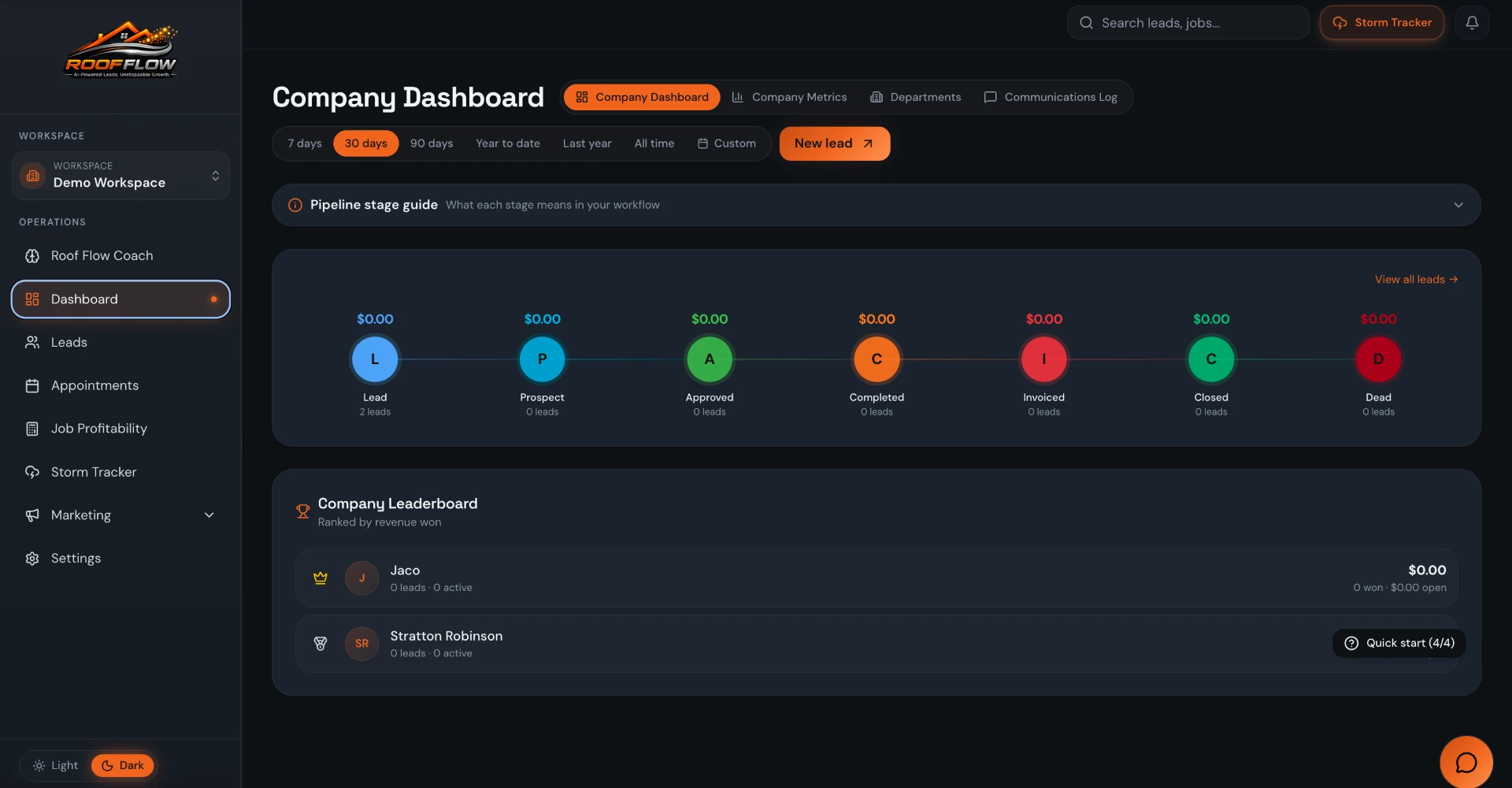
For an owner, the practical test is simple: can you follow one property from inquiry to invoice and understand what your team needs next? Roof Flow AI organizes leads in a pipeline and keeps appointments, photos, documents, inspections, measurements, estimates, work orders and financial information connected to the lead. That shared context matters more than adding another dashboard nobody checks.
Lead → inspection: keep the opportunity and the property together
The first job is to get the inquiry into a place where someone can work it. Roof Flow AI includes lead and pipeline management, assigned ownership, calendar appointments and a communications hub for texting and emailing homeowners. Website form capture can bring contact information and source attribution into the pipeline. Source details can distinguish paid campaigns from organic searches and referrals when the visitor's attribution is available.
That information gives a sales manager a better question than 'How many leads did we get?' You can look at the source and the progress of the work together. A Google click ID, campaign or landing page is useful context, but it is not proof that every visitor can be identified. Missing tracking information stays missing rather than becoming an invented marketing result.
Once an inspection is scheduled, the rep needs the property details, appointment and relevant history. Roof Flow AI supports inspections with custom photo checklists and job photos. CompanyCam sync is available for photo documentation, and Google Calendar sync supports scheduling. The inspection record and photos stay connected to the lead, so estimating and production do not have to reconstruct what the rep saw.
Inspection → estimate: use measurements, materials and margins
A useful estimate starts with information you can review. Roof Flow AI includes AI roof measurements from an address and manual roof tracing on a satellite map, with per-facet pitch and edge classification. Measurements can be saved and versioned on a lead. The public plan includes unlimited free in-house AI roof measurements; your connected EagleView account remains a separate option for its reports.
Estimating tools include a material catalog, imported price lists and material kits with quantity formulas and waste percentages. A kit connects the quantities you need to the measurements instead of making every rep rebuild the same list. Estimates support company default margins, per-line profit margins and manual price locks. These tools help you review the work; they do not remove your responsibility to check measurements, product selections or selling prices.
Keep the inspection photos, measurement version and estimate documents together before sending the proposal. That is especially useful when a homeowner asks why a quantity changed or a production manager needs to understand which scope was sold. A roofing contractor CRM should preserve that context through the handoff rather than leaving the final estimate disconnected from the property record.
Estimate → contract e-sign → production and crews
Roof Flow AI supports estimates with e-signature and document templates with merge fields. Public signing links, in-person signing and stored signed PDFs give your team ways to collect and retain a signature. Keep your scope and contract language appropriate to the work and your jurisdiction: document software is not legal advice, and having an e-signature does not replace a clear agreement with the homeowner.
After the job is sold, production needs instructions it can act on. Roof Flow AI includes work orders, crew dispatch, material orders and crew management with trades, regions and labor rates. A printable crew copy hides pricing. Field crew access is scoped to the crew's jobs, which lets you share work information without handing every installer the office's financial view.
This is where crm roofing workflows become more than sales tracking. The inspection record, scope, photos and work order need to agree. Keeping them attached to the same lead helps the office and field team review the handoff. Crew access is free and unlimited under the public pricing model, so including the field team does not require buying an office seat for every person doing the installation.
See a roofing job move from lead to crew handoff.
Book a demoProduction → invoicing, payments and job profitability
A signed job is not the end of the record. Roof Flow AI includes invoicing and card payments, job financials and job profitability. Material and labor costs belong alongside the sold work so the owner can review what a job actually produced. Company metrics and department dashboards support views across sales, production, insurance review, accounts receivable and accounting.
QuickBooks and Stripe Connect are available integrations, with each workspace connecting its own account. Use the CRM job record to keep the work understandable and the connected accounting and payment tools for their respective roles. Card processing charges still apply when you collect payments. There is no promise that adding a CRM makes a late payer pay or guarantees a particular margin.
The benefit is a more complete operating record: where the job came from, what was estimated, what was signed, who performed the work and what was invoiced. For owners choosing CRM for roofing contractors, ask to see that sequence in a demo. It is a stronger evaluation than comparing a long feature list without watching how information moves between sales and production.
For retail, storm, commercial and multi-location roofing teams
Retail roofing teams can use one record for homeowner inquiries, appointments, estimates, contracts and follow-up conversations. If your reps currently maintain separate lists, a shared pipeline makes ownership and job stage easier to review. You can keep the customer's property details with the estimate and photos instead of asking the homeowner for the same information at each handoff.
Storm and insurance roofing teams can use storm tracking, inspection documentation and connected EagleView reports alongside their pipeline. Those tools support the job record; they do not determine insurance coverage or guarantee a claim outcome. Commercial teams can keep property details, inspections, estimates, work orders and job financials organized for each lead. Review your commercial scope and reporting needs in a demo rather than assuming every workflow is identical to a residential job.
Multi-location operators can separate locations or workspaces without a workspace fee under the public plan. Before switching, decide how you want ownership, crews and business entities organized, then review that structure in a demo. Roof Flow AI is built by a roofer, for roofers, but the right fit still depends on your actual process and the information your team needs to carry from one stage to the next.
Roofing CRM pricing: pay for office users, not every crew member
The current public price is $120 per user, per month. Setup is free, there is no contract, field crew seats are free and unlimited, locations and workspaces are free and unlimited, and in-house AI roof measurements are free and unlimited. Volume discounts start at 10 users. The pricing page is the place to review the current published rates before choosing office seats.
Separate the software price from your operating costs when comparing options. Ad spend goes directly to Meta or Google from your own account, and card processing applies when collecting payments. A connected third-party service can have its own charges. Ask which people need office access and which should have field crew access rather than assuming every person in your company needs the same kind of seat.
| Office users | Per user, per month |
|---|---|
| 1–9 users | $120 |
| 10–19 users | $100 |
| 20–29 users | $85 |
| 30–49 users | $70 |
| 50–99 users | $65 |
| 100+ users | $60 |
Switching from spreadsheets, JobNimbus or AccuLynx
Start with a small, useful inventory: active leads, property addresses, contact details, owners and current job stages. Roof Flow AI supports CSV lead import with field mapping. Review a sample import before moving the rest of your list, and check the important fields against your existing records. Importing contacts is not the same thing as automatically migrating every document, conversation or custom workflow from another product.
If you are switching from JobNimbus or AccuLynx, compare the workflows you actually run rather than relying on a competitor price claim. Walk through a current lead, an inspection, an estimate, a signature, a crew handoff and an invoice. Check which connected tools you want to keep, who needs access and what information has to be carried over. Keep your existing records available while you confirm the new process.
For a spreadsheet-based shop, begin with one shared pipeline and a consistent way to assign leads. Add the estimating and production handoffs once the team can find and update the customer record reliably. The goal is repeatable work, not a complicated rollout. Book a Roof Flow AI demo to review your process, seat count and switching questions before committing your operating records to a new system.
Roofing CRM questions, answered
What is the best roofing CRM for a roofing company?
The best fit is a roofing CRM your team can use from lead to payment. Roof Flow AI connects pipeline, inspections, measurements, estimates, e-signatures, production and invoicing. Evaluate it with your own workflow in a demo rather than assuming one product is best for every company.
How much does Roof Flow AI cost?
The public price is $120 per user, per month, with volume discounts from 10 users. Setup, unlimited field crew seats, unlimited workspaces and in-house AI roof measurements are free. There is no contract. See /pricing for current rates.
Do installers and field crews need paid seats?
Field crew seats are free and unlimited. Crew access is scoped to the crew's jobs, and the printable crew copy hides pricing. Office users use paid seats.
Can I import leads from a spreadsheet or another CRM?
Roof Flow AI supports CSV lead import with field mapping. Review your exported fields and a sample import first; this does not promise automatic migration of every file or workflow from another CRM.
Does the roofing CRM include estimates and e-signature?
Yes. It includes estimates, material catalogs and kits, roof measurements, document templates and e-signature. Signed documents can be retained with the job record.
Can I keep CompanyCam, QuickBooks, Stripe or EagleView?
Roof Flow AI has integrations for CompanyCam, QuickBooks, Stripe Connect and EagleView. Each workspace connects its own accounts; third-party services may have separate costs.
Is it suitable for storm work and commercial properties?
Storm tracking and inspection documentation support storm roofing workflows. Property details, estimates, work orders and job financials can stay connected to each lead for commercial work. Review your specific workflow in a demo; software does not determine insurance coverage.
Can I track where website leads came from?
Website form capture stores available campaign, landing-page, referrer and click-ID attribution with leads. Source details and Channel views help distinguish organic search, paid campaigns and referrals when that tracking information is available.
Review your workflow, your team and your switching questions.
Book a demoRoofing software guides
- Roofing software for contractors
- Best roofing CRM: pricing and fit compared
- Roofing estimating software and measurements
- Roofing project management and crew dispatch
- Roof inspection software and photo checklists
- Commercial roofing software for multi-property work
- Roofing sales software
- CompanyCam alternative for roofing contractors
- Roof Flow AI vs JobNimbus
- Roof Flow AI vs AccuLynx
- Roof Flow AI vs Roofr
- Roof Flow AI vs Leap
- JobNimbus vs AccuLynx
- Roofing CRM pricing: cost per user compared